Some of the products we link to are partners who may pay us when you buy through them. This doesn't change which ones we recommend. How this works.
Live view, two-way audio, and push notifications work on any Arlo camera with no subscription, permanently. What you don't get for free on most current Arlo cameras is cloud recording or AI-based detection (person vs. package vs. animal), both of which require an Arlo Secure plan starting at $7.99/month for a single camera (billed annually) and running up to $49.99/month for the top unlimited-camera tier billed monthly. There's one real exception worth knowing: if your setup includes an Arlo SmartHub or Base Station, local recording to a USB drive or microSD card works without any subscription at all, a detail a lot of comparison articles skip entirely.
What’s Actually Free vs. What Arlo Secure Buys
Arlo, no subscription
- Live view / 2-way audioFree, no plan needed
- Motion alertsFree, but generic ("motion detected")
- Local recording (with SmartHub/Base Station)Free, to USB or microSD
- Cloud recording (no hub)Requires Arlo Secure
Arlo Secure
- Plus (1 camera / unlimited)$7.99–$9.99 / $17.99–$19.99 per mo
- Premium (unlimited cameras)$24.99–$29.99/mo, adds Emergency Response
- Premium + 24/7 Recording$39.99–$49.99/mo, up to 3 cameras
- Cloud video history60 days, rolling
Confirmed against Arlo’s own support documentation and the live Arlo Secure plan pages (checked directly, both the annual and monthly toggle, on September 13, 2026). Exact pricing varies by region and promotional bundling at time of purchase; confirm the current tier price at checkout.

The Detail Most Comparisons Skip: The Hub Changes Everything
Most current Arlo cameras (the Essential and Pro lines especially) are designed to connect directly to Wi-Fi with no separate hub, which is convenient for setup but means there’s no local storage device in the system at all. Without a hub, cloud storage through Arlo Secure is the only way to keep any recorded video, which is why most “Arlo without a subscription” searches land on the conclusion that recording requires a paid plan.
That changes if your camera connects through an Arlo SmartHub or Base Station instead, either because you bought an older bundle that included one or added one separately. With a hub in the system, Arlo supports recording directly to a USB drive or microSD card inserted in the hub itself, no subscription required for that storage. This is functionally similar to how Wyze and Eufy build local storage into their systems, except Arlo doesn’t advertise it as a headline feature the way those brands do, since Arlo’s more recent hardware and marketing push toward the hubless, cloud-subscription model instead.
- Who should NOT assume Arlo recording is always paid-only: anyone specifically shopping for a hub-based Arlo bundle (SmartHub or Base Station included) rather than a standalone hubless camera; local recording is a real, free option in that setup.
- Who should budget for Arlo Secure: anyone buying a current hubless Essential or Pro-series camera, where cloud storage through a paid plan is the only recording option at all.
If you already own hubless Arlo cameras, adding a hub is the way to get free local recording. Arlo’s local storage documentation lists two current SmartHubs that support it, and they take different storage. The Pro SmartHub (VMB4540) records to a USB flash drive or external hard drive. The Ultra SmartHub (VMB5000) has no USB port and uses a microSD card instead. Either way the drive has to be FAT32 with at least 16GB free, and only motion-triggered clips are saved locally; manual recordings still go to the cloud. Camera compatibility differs between the two hubs, so check your model against the product listing before buying.
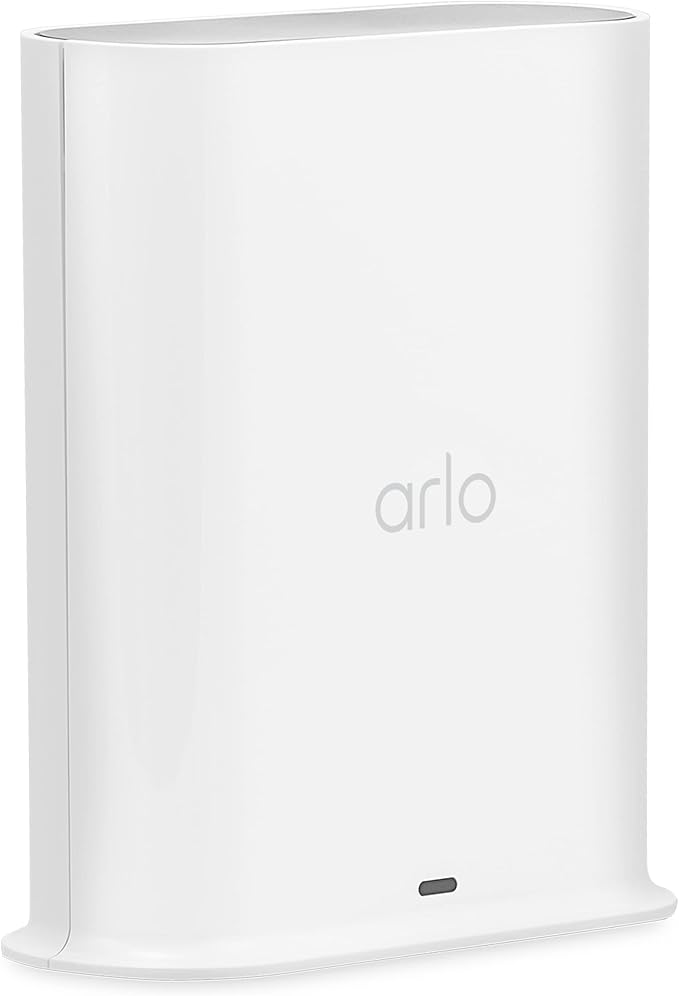
Arlo Pro SmartHub (VMB4540)
Records motion clips to a USB drive with no subscription. 4.0★ (1,393 ratings).

Arlo Ultra SmartHub (VMB5000)
Records motion clips to a microSD card with no subscription. 4.2★ (746 ratings).
What Arlo Secure Actually Adds
Beyond recording itself, Arlo Secure’s core value is turning a generic “motion detected” push notification into something specific: person, package, vehicle, or animal detection, plus customizable activity zones so the camera only alerts on movement in areas you actually care about. Without the subscription, you still get notified that something moved, but not what it was or where in the frame, which matters if false alerts from passing cars or blowing branches are the actual problem you’re trying to solve.
Arlo also sells a separate, higher-cost emergency response add-on on top of Secure, which connects detected events to professional monitoring similar to Ring Protect Pro. That’s a distinct upsell from basic Secure and isn’t included by default at the standard tier.
- Who should NOT buy Arlo expecting smart detection for free: anyone whose main complaint about generic motion alerts is false positives from cars, pets, or weather; that filtering is specifically an Arlo Secure feature, not a hardware one.
- Who it’s right for: anyone who mainly wants to know “did something move” in real time and is fine reviewing that judgment call themselves rather than paying for AI to pre-filter it.

Arlo vs. Ring, Nest, Wyze, and Eufy
Our Ring and Nest without a subscription guide covers the two biggest subscription-gated camera brands; both keep live view free and charge for any recorded history, with no local-storage option at all on current hardware. Arlo sits in between: hubless models behave the same way Ring and Nest do, but hub-based Arlo setups genuinely match what Wyze and Eufy are built around from the start, free local recording, no subscription required for that core function. The practical takeaway is that “Arlo” isn’t one answer; it depends specifically on whether a hub is part of your setup.
Who Should NOT Buy Arlo Expecting Zero Ongoing Cost
If you’re specifically shopping for a hubless, standalone camera and want recording without ever paying monthly, Arlo’s current hubless lineup isn’t built for that, Wyze or Eufy are the more direct fit. Arlo makes more sense if you’re open to a hub-based setup (trading a bit more upfront hardware and setup complexity for genuinely free local recording) or if you’ve already decided the smart detection and cloud backup in Arlo Secure are worth paying for regardless.

FAQ
Does Arlo work at all without a subscription? Yes. Live view, two-way audio, and basic motion push notifications work permanently with no plan, on every current Arlo camera.
Can I record video from an Arlo camera for free? Only if your system includes an Arlo SmartHub or Base Station, in which case local recording to a USB drive or microSD card works with no subscription. Hubless cameras (most current standalone Essential and Pro models) require Arlo Secure for any recorded video.
What does Arlo Secure actually cost? $7.99/month for a single camera on the Plus plan (annual billing) up to $49.99/month for Premium with 24/7 continuous recording on monthly billing. Annual billing runs about 20% cheaper per month than paying monthly at every tier; confirm the current price at checkout since it can shift.
Is Arlo’s smart detection (person vs. package vs. animal) free? No. Without Arlo Secure, alerts are generic “motion detected” notifications. Detailed object detection and custom activity zones are part of the paid plan.
Bottom Line
- You have or are buying a hub-based Arlo system: you can record locally for free; Arlo Secure is optional and mainly buys smarter alerts, not the ability to record at all.
- You’re buying a current hubless Arlo camera: budget for Arlo Secure if recorded history matters to you; there’s no free local-storage path without a hub.
- You want guaranteed free recording with no hub-vs-hubless research required: the Wyze Cam v4 or eufy Video Doorbell E340 build local storage in by default, no separate hub purchase needed.